
Miner Stats1.69 - App Store
You'll be able to see results in few seconds.
Publisher Description
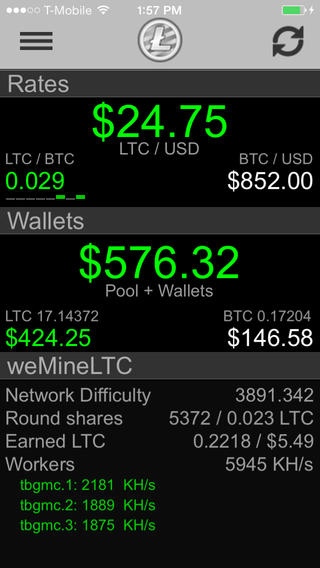
Miner Stats consolidates stats from your associated Litecoin Pool and provides an easy to read, constantly updating dashboard to track your earnings and mining performance.
Market valuations for Litecoin and Bitcoin are also included in the dashboard view and are updated regularly via BTC-e and Coinbase.
Miner Stats can also help track your complete crypto-currency asset valuations! With our new online Wallet feature, Miner Stats will automatically check the current balance of provided LTC and/or BTC addresses while computing the value of each based on associated market rates. Alternatively, users can still enter simple coin values instead of addresses and market rate conversions will still occur - your choice!
The following two Litecoin Pools are known to work:
wemineltc.com
give-me-coins.com
litecoinpool.org
hypernova.pw
ltcrabbit.com
liteGuardian.com
ielitepool.com
Features:
-Push notification support with custom subscriptions
-Monitored wallet address notifications
-Supports 9 Local Currencies estimates: USD, EUR, GBP, AUD, CNY, RUB, CHF, NZD & JPY
-Local notifications for Network Difficulty changes, pool payout detection
-Offline and online wallet valuation for Litecoin, Bitcoin and confirmed rewards from your pool
-Shake to refresh
-LTC ticker heartbeat shows recent market fluctuations
-Enhanced visual queues for price fluctuations and daily trends
-Bitcoin news via coindesk.com
-Opt-in anonymously shared stats to compare against other miners
Roadmap:
-Supporting more Litecoin Pools (please email us your pool API specifics so we can add support!)
-More custom push notification subscriptions
-Graphs of the associated currency valuations, pool metrics and trends.
Additional features / pool support can be requested via:
ios.minerStats@gmail.com or on twitter @ gregr401
Requires iOS 6.0 or later. Compatible with iPhone, iPad, and iPod touch.
About Miner Stats
The company that develops Miner Stats is Greg Richardson. The latest version released by its developer is 1.69.
To install Miner Stats on your iOS device, just click the green Continue To App button above to start the installation process. The app is listed on our website since 2013-12-30 and was downloaded 0 times. We have already checked if the download link is safe, however for your own protection we recommend that you scan the downloaded app with your antivirus. Your antivirus may detect the Miner Stats as malware if the download link is broken.
How to install Miner Stats on your iOS device:
- Click on the Continue To App button on our website. This will redirect you to the App Store.
- Once the Miner Stats is shown in the iTunes listing of your iOS device, you can start its download and installation. Tap on the GET button to the right of the app to start downloading it.
- If you are not logged-in the iOS appstore app, you'll be prompted for your your Apple ID and/or password.
- After Miner Stats is downloaded, you'll see an INSTALL button to the right. Tap on it to start the actual installation of the iOS app.
- Once installation is finished you can tap on the OPEN button to start it. Its icon will also be added to your device home screen.
Program Details
System requirements
Download information
Pricing
Version History
version 1.69
posted on 2013-12-30
Disclaimer
Official App Store Link
We do not host Miner Stats on our servers. We did not scan it for viruses, adware, spyware or other type of malware. This app is hosted by Apple and passed their terms and conditions to be listed there. We recommend caution when installing it.
The App Store link for Miner Stats is provided to you by apps112.com without any warranties, representations or guarantees of any kind, so access it at your own risk.
If you have questions regarding this particular app contact the publisher directly. For questions about the functionalities of apps112.com contact us.
